Create beautiful visual art in .png and .pdf documents using design philosophy. You should use this skill when the user asks to create a poster, piece of art, design, or other static piece. Create original visual designs, never copying existing artists' work to avoid copyright violations.
Archify
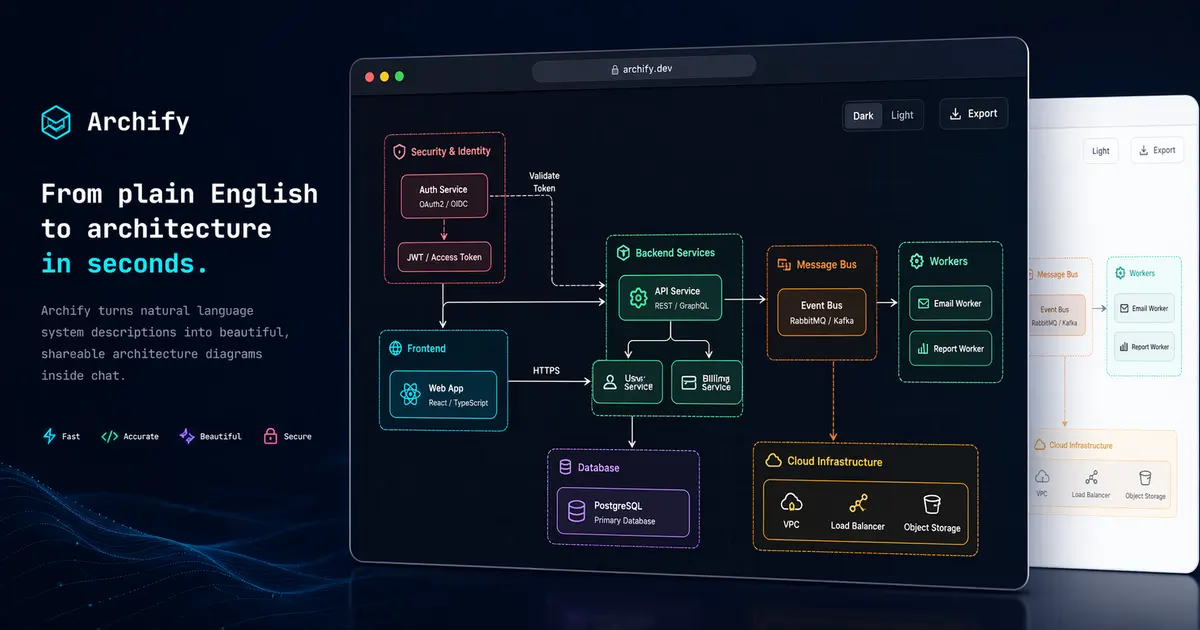
Archify is an open-source design skill for Codex and opencode, published by tt-a1i. Its author describes it as: “Agent skill for beautiful, verifiable architecture, workflow, sequence, data-flow, and lifecycle diagrams—self-contained HTML with motion and crisp export.”. The project has 8.1k stars on GitHub and is available under the MIT license. Add it to your setup with `git clone https://github.com/tt-a1i/archify ~/.claude/skills/archify`.
Installation
Add Archify to your agent with:
git clone https://github.com/tt-a1i/archify ~/.claude/skills/archify Always review a skill's source before installing it. This command comes from the skill's public repository; the linked repo is the source of truth for exact setup steps.
When to use it
Reach for Archify when you want design help from Codex without writing the same instructions every session. Load the skill and the agent picks it up automatically for relevant tasks.
Strengths
- Clear MIT license — safe to read and adapt
- Established project with 8,121 GitHub stars
- Declares compatibility with Codex, opencode
- Actively maintained (recent commits)
Topics
Frequently asked questions
- What does Archify do?
- Agent skill for beautiful, verifiable architecture, workflow, sequence, data-flow, and lifecycle diagrams—self-contained HTML with motion and crisp export.
- How do I install Archify?
- Run git clone https://github.com/tt-a1i/archify ~/.claude/skills/archify in your agent, then reload your skills. Review the source at https://github.com/tt-a1i/archify before installing.
- Is Archify free to use?
- Yes. Archify is free and open source under the MIT license, so you can read, run, and adapt it within that license's terms.
- Which agents does Archify work with?
- Archify declares compatibility with Codex and opencode. Agent Skills use a portable SKILL.md format, so other compatible clients can usually load it too.
Related skills
More Design →Use when the user requests diagrams, flowcharts, architecture diagrams, ER diagrams, UML / sequence / class diagrams, SysML / MBSE diagrams (block definition, internal block, requirement, parametric), BPMN business process diagrams, swimlane / cross-functional flowcharts, network topology, cloud architecture from Terraform or Kubernetes manifests, ML/DL model figures (Transformer/CNN/LSTM), mind maps, or any visualization. Also use proactively when explaining systems with 3+ components, complex data flows, or relationships that benefit from visual representation. Best suited when the diagram needs custom styling, rich shape vocabulary, swimlanes, or exportable images (PNG/SVG/PDF/JPG). Generates .drawio XML and exports locally via the native draw.io desktop CLI.
Generate draw.io diagrams from natural language — 11 presets (UML, SysML/MBSE, BPMN, network, C4…), 36 tools: codebase/CI/infra-to-diagram, image→editable diagram, mind maps, build-up animation, exec-view compression, click-through runbooks, PR diff bot. Vision self-check, 10,000+ shapes. Exports PNG/SVG/PDF/JPG.
Create cinematic product videos from shot recipe cards, a validated template, and code/audio assets (Remotion + real page screenshots + 2.5D camera moves + beat-synced cuts + sound design). Use when the user asks to turn a frontend project or webpage into a product video, says "use video-shotcraft to make a video/promo", names the Ink Press template or asks to reproduce its effect, or wants a single shot card's motion. 用镜头配方卡 + 已验收模板 + 代码/音频资产制作电影感产品视频(Remotion + 真实页面截图 + 2.5D 运镜 + 节奏卡点 + 声音设计)。当用户要求"用 video-shotcraft 做视频/宣传片"、把前端项目/网页做成产品视频、点名 Ink Press 模板或要求复刻模板片效果,或要用镜头卡做单个动效镜头时使用。
Required before calling image_generate. Create and edit images from a prompt — generate an image, make a picture / logo / illustration / icon / banner / poster / thumbnail / hero image / mockup / product shot / social graphic, or edit / restyle / combine existing images from reference images. Uses OpenAI gpt-image-2 through the Hive image service, billed to the user's Hive credits like an LLM call (no API key needed). Teaches the exact call shape, the quality/cost tradeoff (quality="low" is the default and cheapest), reference-image editing, how to show the result to the user with attach_file, and the failure modes (out of credits, model unavailable, moderation).